大家好,我是java1234_小锋老师,看到一个不错的SpringBoot+Vue垃圾分类管理【论文+源码+SQL脚本】,分享下哈。
项目视频演示
【免费】Springboot+Vue垃圾分类管理系统 Java毕业设计_哔哩哔哩_bilibili
项目介绍
本论文主要论述了如何使用JAVA语言开发一个垃圾分类网站 ,本系统将严格按照软件开发流程进行各个阶段的工作,采用B/S架构,面向对象编程思想进行项目开发。在引言中,作者将论述垃圾分类网站的当前背景以及系统开发的目的,后续章节将严格按照软件开发流程,对系统进行各个阶段分析设计。
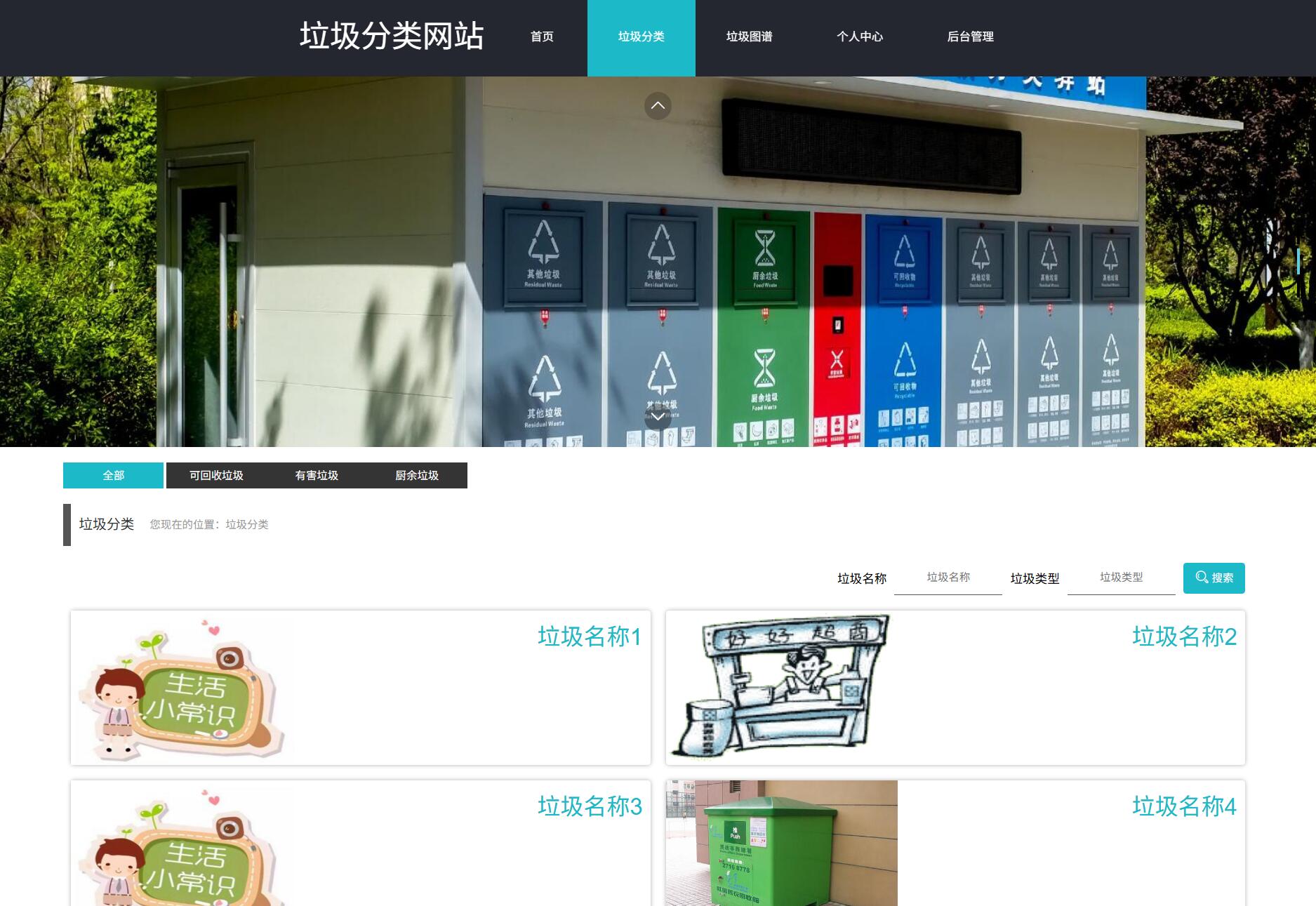
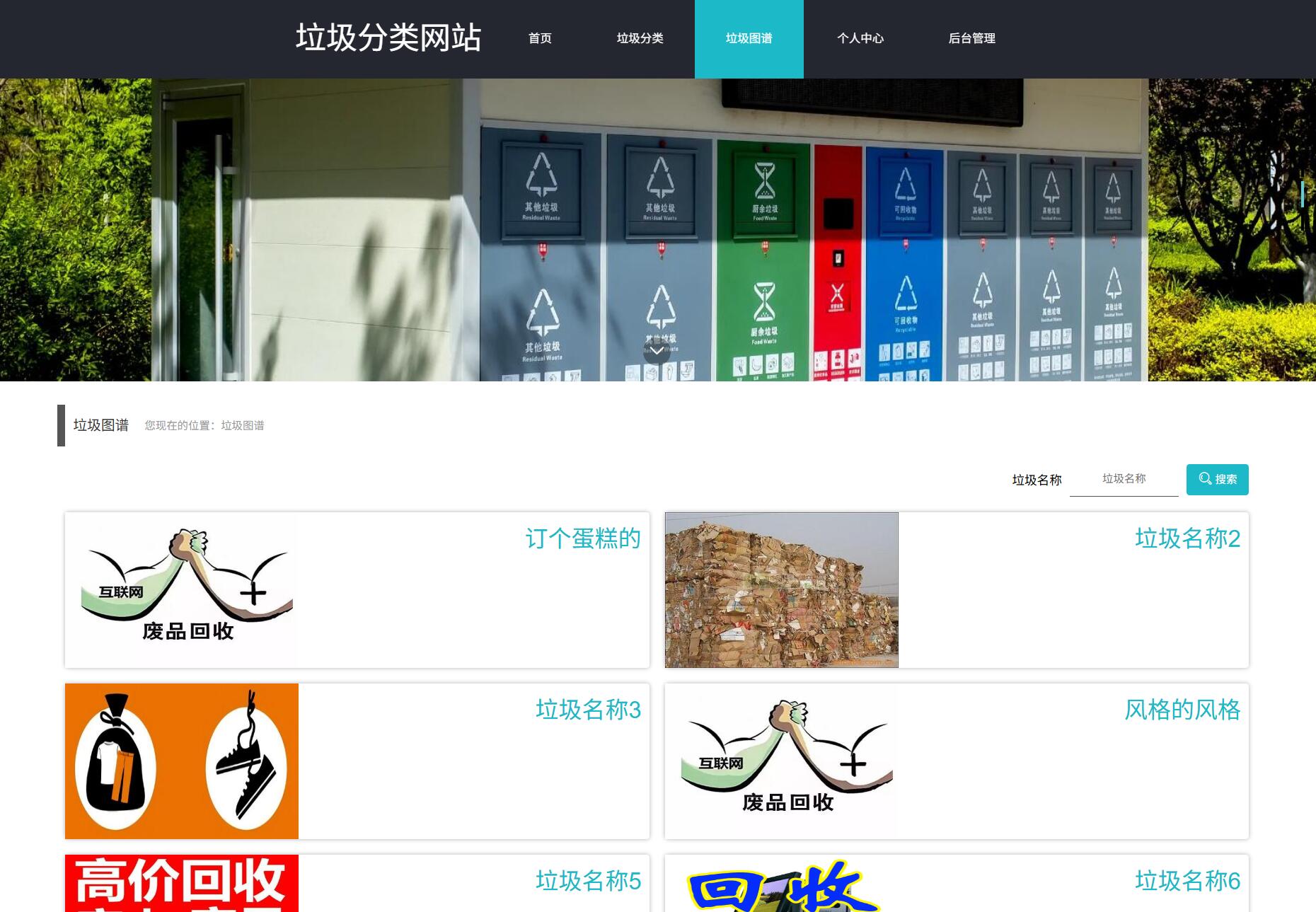
垃圾分类网站的主要使用者分为管理员和用户、垃圾分类管理员,实现功能包括管理员:首页、个人中心、用户管理、垃圾分类管理员管理、垃圾分类管理、垃圾类型管理、垃圾图谱管理、系统管理,垃圾分类管理员;首页、个人中心、用户管理、垃圾分类管理员管理、垃圾分类管理、垃圾类型管理、垃圾图谱管理,用户前台;首页、垃圾分类、垃圾图谱、个人中心、后台管理等功能。由于本网站的功能模块设计比较全面,所以使得整个垃圾分类网站信息管理的过程得以实现。
本系统的使用可以实现本垃圾分类网站管理的信息化,可以方便管理员进行更加方便快捷的管理,可以提高管理人员的工作效率。
系统展示
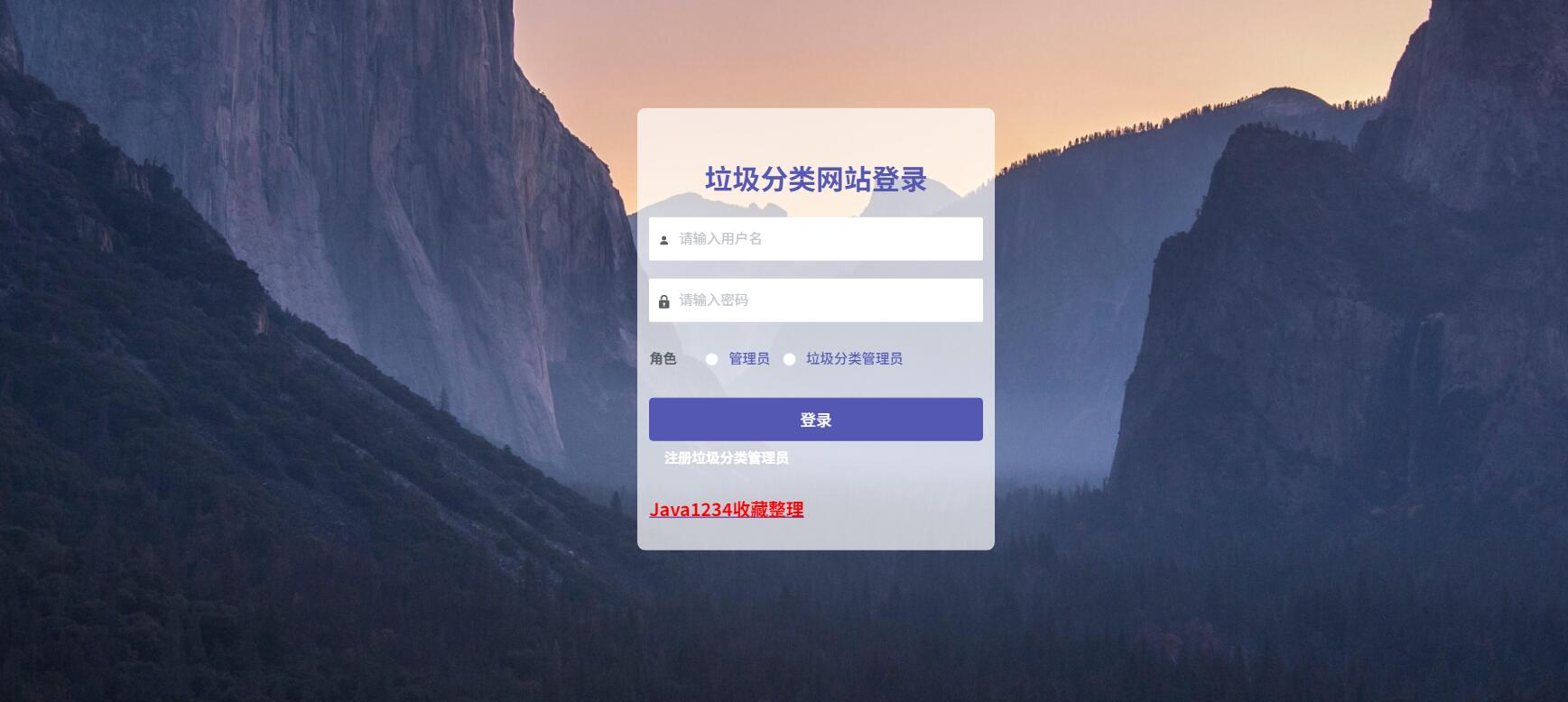
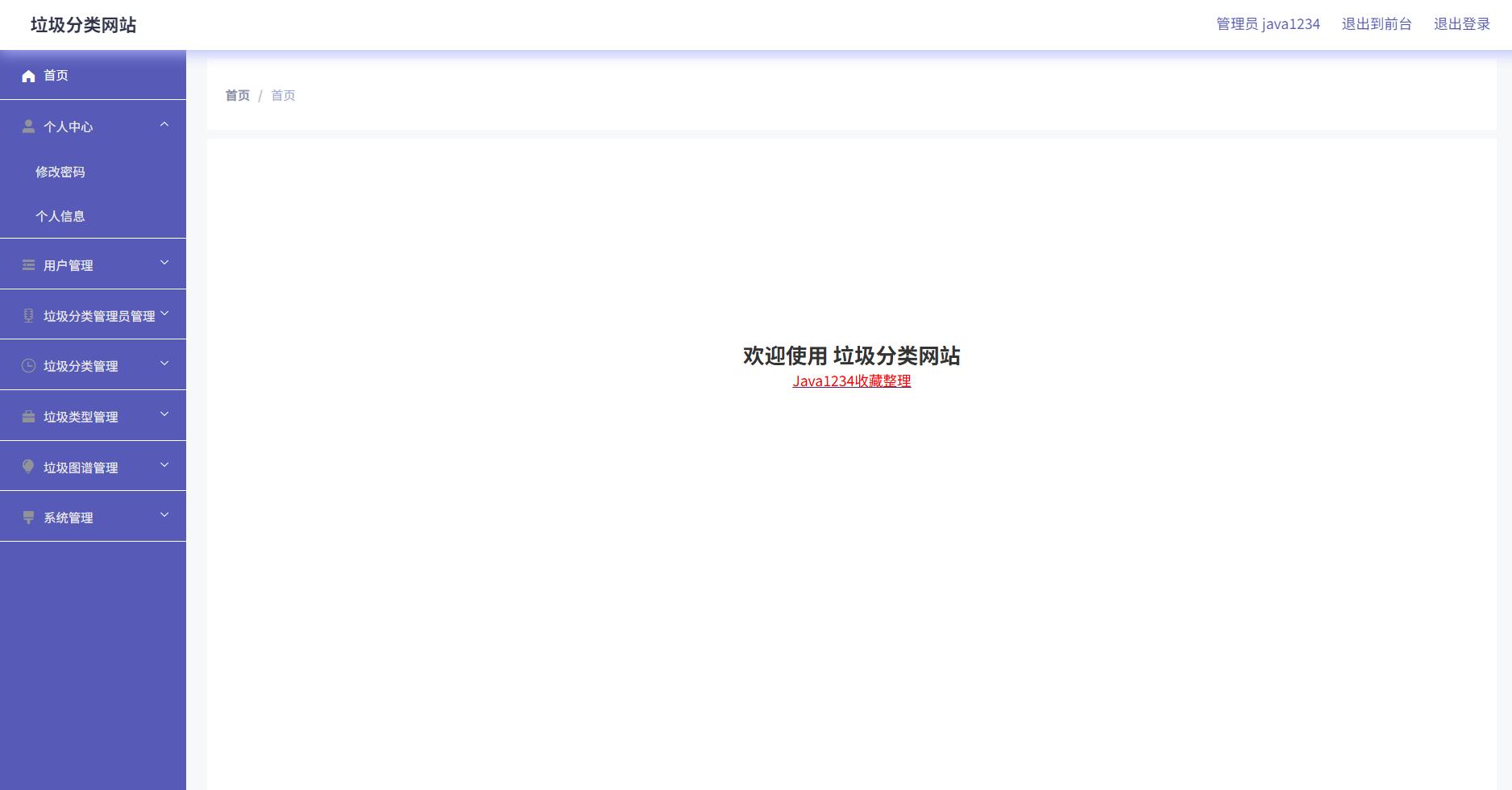
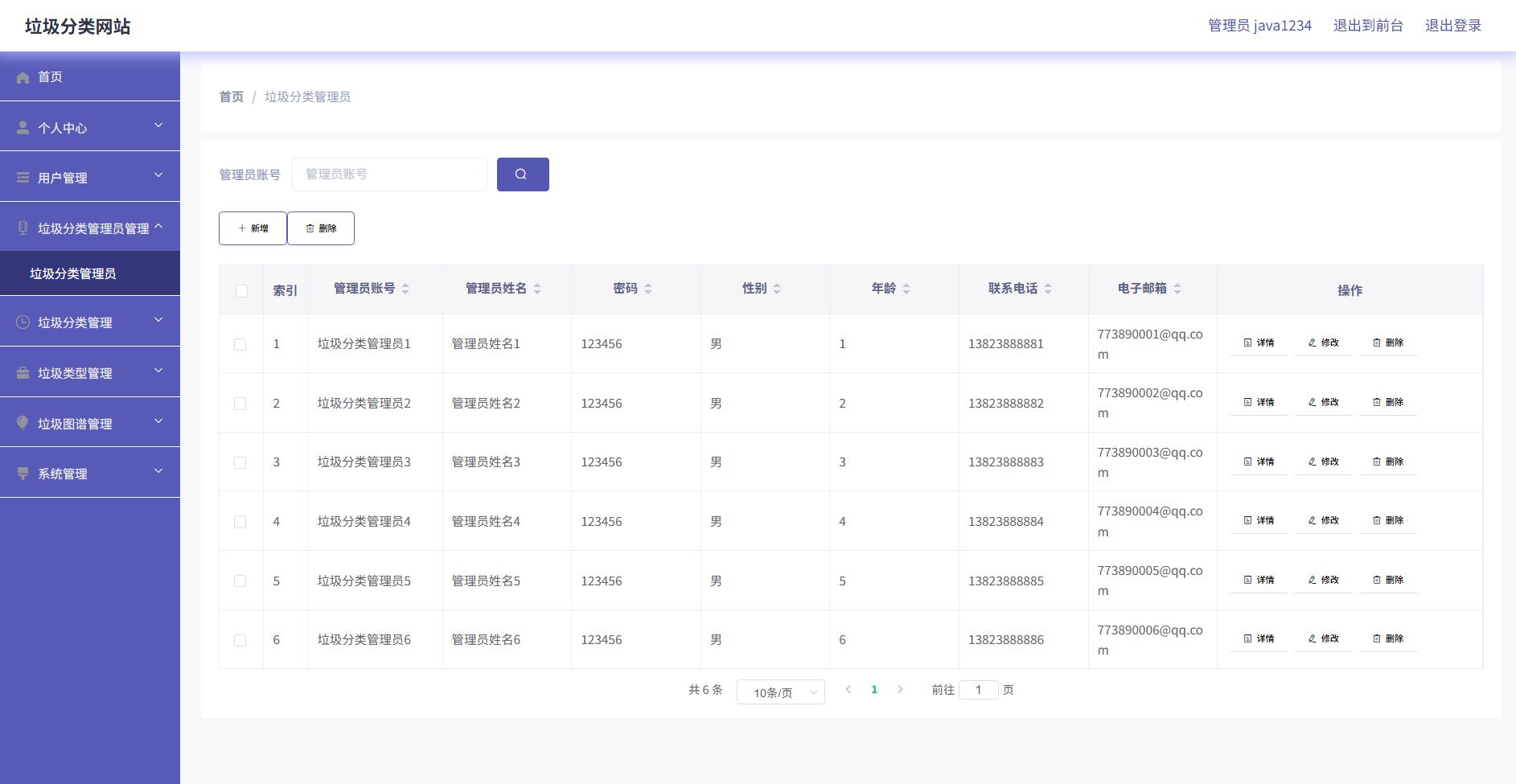
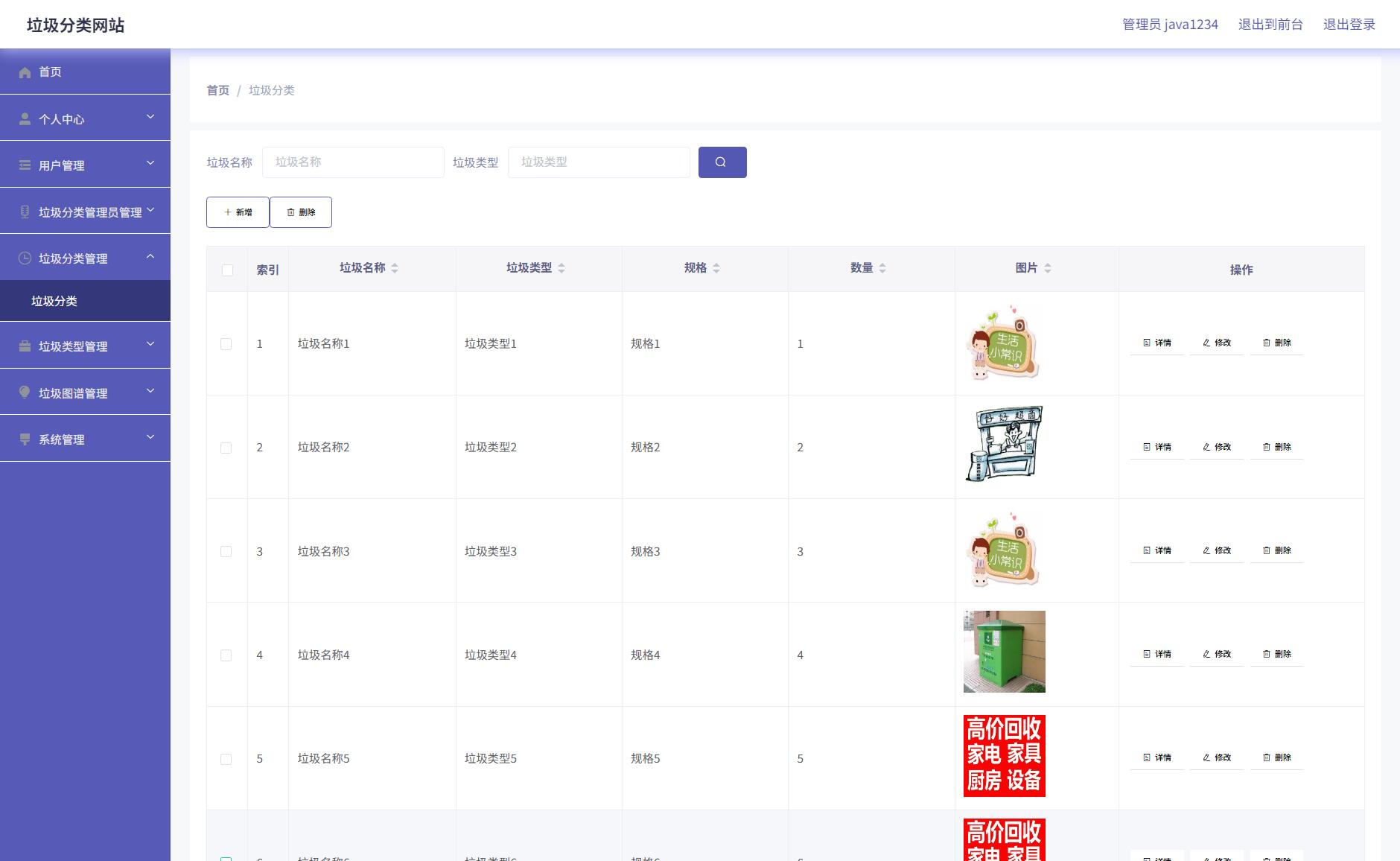
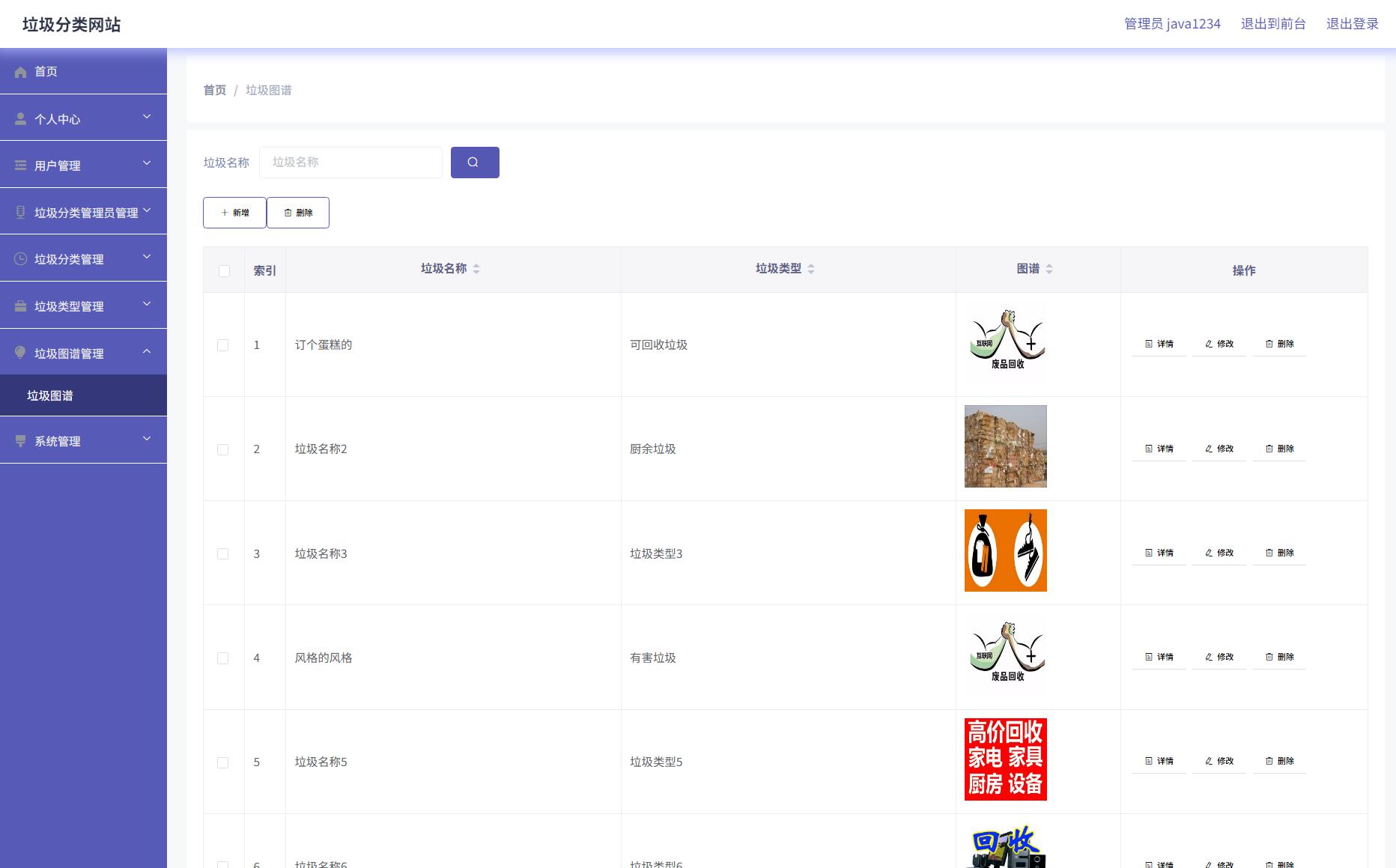
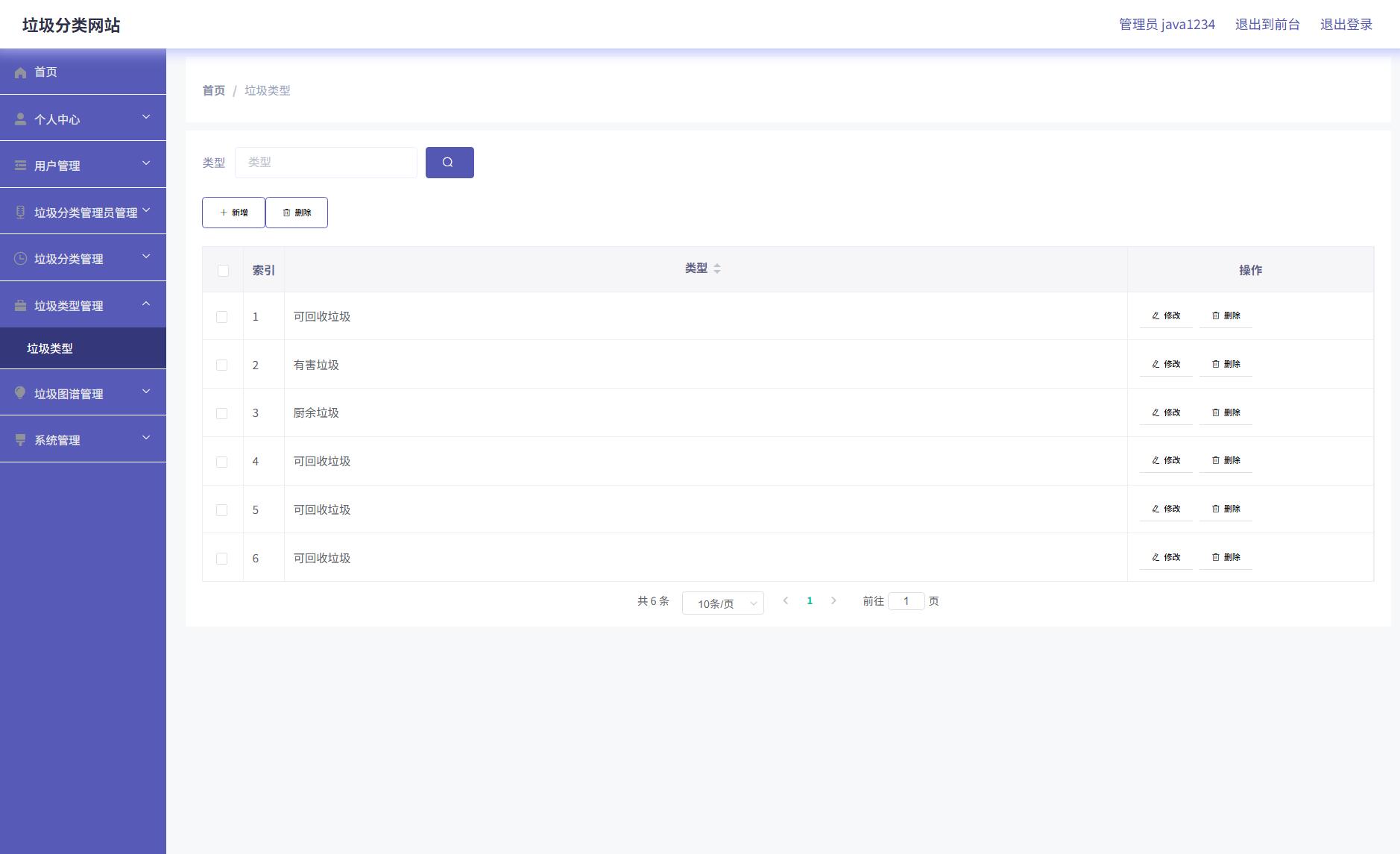
部分代码
package com.controller;import java.text.SimpleDateFormat;
import java.util.ArrayList;
import java.util.Arrays;
import java.util.Calendar;
import java.util.Map;
import java.util.HashMap;
import java.util.Iterator;
import java.util.Date;
import java.util.List;
import javax.servlet.http.HttpServletRequest;import com.utils.ValidatorUtils;
import org.apache.commons.lang3.StringUtils;
import org.springframework.beans.factory.annotation.Autowired;
import org.springframework.web.bind.annotation.PathVariable;
import org.springframework.web.bind.annotation.RequestBody;
import org.springframework.web.bind.annotation.RequestMapping;
import org.springframework.web.bind.annotation.RequestParam;
import org.springframework.web.bind.annotation.RestController;
import com.baomidou.mybatisplus.mapper.EntityWrapper;
import com.baomidou.mybatisplus.mapper.Wrapper;
import com.annotation.IgnoreAuth;import com.entity.YonghuEntity;
import com.entity.view.YonghuView;import com.service.YonghuService;
import com.service.TokenService;
import com.utils.PageUtils;
import com.utils.R;
import com.utils.MD5Util;
import com.utils.MPUtil;
import com.utils.CommonUtil;/*** 用户* 后端接口* @author * @email * @date 2021-02-26 22:27:18*/
@RestController
@RequestMapping("/yonghu")
public class YonghuController {@Autowiredprivate YonghuService yonghuService;@Autowiredprivate TokenService tokenService;/*** 登录*/@IgnoreAuth@RequestMapping(value = "/login")public R login(String username, String password, String captcha, HttpServletRequest request) {YonghuEntity user = yonghuService.selectOne(new EntityWrapper<YonghuEntity>().eq("zhanghao", username));if(user==null || !user.getMima().equals(password)) {return R.error("账号或密码不正确");}String token = tokenService.generateToken(user.getId(), username,"yonghu",  "用户" );return R.ok().put("token", token);}/*** 注册*/@IgnoreAuth@RequestMapping("/register")public R register(@RequestBody YonghuEntity yonghu){//ValidatorUtils.validateEntity(yonghu);YonghuEntity user = yonghuService.selectOne(new EntityWrapper<YonghuEntity>().eq("zhanghao", yonghu.getZhanghao()));if(user!=null) {return R.error("注册用户已存在");}Long uId = new Date().getTime();yonghu.setId(uId);yonghuService.insert(yonghu);return R.ok();}/*** 退出*/@RequestMapping("/logout")public R logout(HttpServletRequest request) {request.getSession().invalidate();return R.ok("退出成功");}/*** 获取用户的session用户信息*/@RequestMapping("/session")public R getCurrUser(HttpServletRequest request){Long id = (Long)request.getSession().getAttribute("userId");YonghuEntity user = yonghuService.selectById(id);return R.ok().put("data", user);}/*** 密码重置*/@IgnoreAuth@RequestMapping(value = "/resetPass")public R resetPass(String username, HttpServletRequest request){YonghuEntity user = yonghuService.selectOne(new EntityWrapper<YonghuEntity>().eq("zhanghao", username));if(user==null) {return R.error("账号不存在");}user.setMima("123456");yonghuService.updateById(user);return R.ok("密码已重置为:123456");}/*** 后端列表*/@RequestMapping("/page")public R page(@RequestParam Map<String, Object> params,YonghuEntity yonghu, HttpServletRequest request){EntityWrapper<YonghuEntity> ew = new EntityWrapper<YonghuEntity>();PageUtils page = yonghuService.queryPage(params, MPUtil.sort(MPUtil.between(MPUtil.likeOrEq(ew, yonghu), params), params));return R.ok().put("data", page);}/*** 前端列表*/@RequestMapping("/list")public R list(@RequestParam Map<String, Object> params,YonghuEntity yonghu, HttpServletRequest request){EntityWrapper<YonghuEntity> ew = new EntityWrapper<YonghuEntity>();PageUtils page = yonghuService.queryPage(params, MPUtil.sort(MPUtil.between(MPUtil.likeOrEq(ew, yonghu), params), params));return R.ok().put("data", page);}/*** 列表*/@RequestMapping("/lists")public R list( YonghuEntity yonghu){EntityWrapper<YonghuEntity> ew = new EntityWrapper<YonghuEntity>();ew.allEq(MPUtil.allEQMapPre( yonghu, "yonghu")); return R.ok().put("data", yonghuService.selectListView(ew));}/*** 查询*/@RequestMapping("/query")public R query(YonghuEntity yonghu){EntityWrapper< YonghuEntity> ew = new EntityWrapper< YonghuEntity>();ew.allEq(MPUtil.allEQMapPre( yonghu, "yonghu")); YonghuView yonghuView =  yonghuService.selectView(ew);return R.ok("查询用户成功").put("data", yonghuView);}/*** 后端详情*/@RequestMapping("/info/{id}")public R info(@PathVariable("id") Long id){YonghuEntity yonghu = yonghuService.selectById(id);return R.ok().put("data", yonghu);}/*** 前端详情*/@RequestMapping("/detail/{id}")public R detail(@PathVariable("id") Long id){YonghuEntity yonghu = yonghuService.selectById(id);return R.ok().put("data", yonghu);}/*** 后端保存*/@RequestMapping("/save")public R save(@RequestBody YonghuEntity yonghu, HttpServletRequest request){yonghu.setId(new Date().getTime()+new Double(Math.floor(Math.random()*1000)).longValue());//ValidatorUtils.validateEntity(yonghu);YonghuEntity user = yonghuService.selectOne(new EntityWrapper<YonghuEntity>().eq("zhanghao", yonghu.getZhanghao()));if(user!=null) {return R.error("用户已存在");}yonghu.setId(new Date().getTime());yonghuService.insert(yonghu);return R.ok();}/*** 前端保存*/@RequestMapping("/add")public R add(@RequestBody YonghuEntity yonghu, HttpServletRequest request){yonghu.setId(new Date().getTime()+new Double(Math.floor(Math.random()*1000)).longValue());//ValidatorUtils.validateEntity(yonghu);YonghuEntity user = yonghuService.selectOne(new EntityWrapper<YonghuEntity>().eq("zhanghao", yonghu.getZhanghao()));if(user!=null) {return R.error("用户已存在");}yonghu.setId(new Date().getTime());yonghuService.insert(yonghu);return R.ok();}/*** 修改*/@RequestMapping("/update")public R update(@RequestBody YonghuEntity yonghu, HttpServletRequest request){//ValidatorUtils.validateEntity(yonghu);yonghuService.updateById(yonghu);//全部更新return R.ok();}/*** 删除*/@RequestMapping("/delete")public R delete(@RequestBody Long[] ids){yonghuService.deleteBatchIds(Arrays.asList(ids));return R.ok();}/*** 提醒接口*/@RequestMapping("/remind/{columnName}/{type}")public R remindCount(@PathVariable("columnName") String columnName, HttpServletRequest request, @PathVariable("type") String type,@RequestParam Map<String, Object> map) {map.put("column", columnName);map.put("type", type);if(type.equals("2")) {SimpleDateFormat sdf = new SimpleDateFormat("yyyy-MM-dd");Calendar c = Calendar.getInstance();Date remindStartDate = null;Date remindEndDate = null;if(map.get("remindstart")!=null) {Integer remindStart = Integer.parseInt(map.get("remindstart").toString());c.setTime(new Date()); c.add(Calendar.DAY_OF_MONTH,remindStart);remindStartDate = c.getTime();map.put("remindstart", sdf.format(remindStartDate));}if(map.get("remindend")!=null) {Integer remindEnd = Integer.parseInt(map.get("remindend").toString());c.setTime(new Date());c.add(Calendar.DAY_OF_MONTH,remindEnd);remindEndDate = c.getTime();map.put("remindend", sdf.format(remindEndDate));}}Wrapper<YonghuEntity> wrapper = new EntityWrapper<YonghuEntity>();if(map.get("remindstart")!=null) {wrapper.ge(columnName, map.get("remindstart"));}if(map.get("remindend")!=null) {wrapper.le(columnName, map.get("remindend"));}int count = yonghuService.selectCount(wrapper);return R.ok().put("count", count);}}
<template><div><div class="container loginIn" style="backgroundImage: url(http://codegen.caihongy.cn/20201229/62bdeb5fd0fd4317b57e5c384398e66d.jpg)"><div :class="2 == 1 ? 'left' : 2 == 2 ? 'left center' : 'left right'" style="backgroundColor: rgba(255, 255, 255, 0.71)"><el-form class="login-form" label-position="left" :label-width="1 == 3 ? '56px' : '0px'"><div class="title-container"><h3 class="title" style="color: rgba(84, 88, 179, 1)">垃圾分类网站登录</h3></div><el-form-item :label="1 == 3 ? '用户名' : ''" :class="'style'+1"><span v-if="1 != 3" class="svg-container" style="color:rgba(89, 97, 102, 1);line-height:44px"><svg-icon icon-class="user" /></span><el-input placeholder="请输入用户名" name="username" type="text" v-model="rulesForm.username" /></el-form-item><el-form-item :label="1 == 3 ? '密码' : ''" :class="'style'+1"><span v-if="1 != 3" class="svg-container" style="color:rgba(89, 97, 102, 1);line-height:44px"><svg-icon icon-class="password" /></span><el-input placeholder="请输入密码" name="password" type="password" v-model="rulesForm.password" /></el-form-item><el-form-item v-if="0 == '1'" class="code" :label="1 == 3 ? '验证码' : ''" :class="'style'+1"><span v-if="1 != 3" class="svg-container" style="color:rgba(89, 97, 102, 1);line-height:44px"><svg-icon icon-class="code" /></span><el-input placeholder="请输入验证码" name="code" type="text" v-model="rulesForm.code" /><div class="getCodeBt" @click="getRandCode(4)" style="height:44px;line-height:44px"><span v-for="(item, index) in codes" :key="index" :style="{color:item.color,transform:item.rotate,fontSize:item.size}">{{ item.num }}</span></div></el-form-item><el-form-item label="角色" prop="loginInRole" class="role"><el-radiov-for="item in menus"v-if="item.hasBackLogin=='是'"v-bind:key="item.roleName"v-model="rulesForm.role":label="item.roleName">{{item.roleName}}</el-radio></el-form-item><el-button type="primary" @click="login()" class="loginInBt" style="padding:0;font-size:16px;border-radius:4px;height:44px;line-height:44px;width:100%;backgroundColor:rgba(84, 88, 179, 1); borderColor:rgba(84, 88, 179, 1); color:rgba(255, 255, 255, 1)">{{'1' == '1' ? '登录' : 'login'}}</el-button><el-form-item class="setting"><div style="color:rgba(255, 255, 255, 1)" class="register" @click="register('lajifenleiguanliyuan')">注册垃圾分类管理员</div><!-- <div style="color:rgba(255, 255, 255, 1)" class="reset">修改密码</div> --></el-form-item></el-form></div></div></div>
</template>
<script>
import menu from "@/utils/menu";
export default {data() {return {rulesForm: {username: "",password: "",role: "",code: '',},menus: [],tableName: "",codes: [{num: 1,color: '#000',rotate: '10deg',size: '16px'},{num: 2,color: '#000',rotate: '10deg',size: '16px'},{num: 3,color: '#000',rotate: '10deg',size: '16px'},{num: 4,color: '#000',rotate: '10deg',size: '16px'}],};},mounted() {let menus = menu.list();this.menus = menus;},created() {this.setInputColor()this.getRandCode()},methods: {setInputColor(){this.$nextTick(()=>{document.querySelectorAll('.loginIn .el-input__inner').forEach(el=>{el.style.backgroundColor = "rgba(255, 255, 255, 1)"el.style.color = "rgba(0, 0, 0, 1)"el.style.height = "44px"el.style.lineHeight = "44px"el.style.borderRadius = "2px"})document.querySelectorAll('.loginIn .style3 .el-form-item__label').forEach(el=>{el.style.height = "44px"el.style.lineHeight = "44px"})document.querySelectorAll('.loginIn .el-form-item__label').forEach(el=>{el.style.color = "rgba(89, 97, 102, 1)"})setTimeout(()=>{document.querySelectorAll('.loginIn .role .el-radio__label').forEach(el=>{el.style.color = "rgba(84, 88, 179, 1)"})},350)})},register(tableName){this.$storage.set("loginTable", tableName);this.$router.push({path:'/register'})},// 登陆login() {let code = ''for(let i in this.codes) {code += this.codes[i].num}if ('0' == '1' && !this.rulesForm.code) {this.$message.error("请输入验证码");return;}if ('0' == '1' && this.rulesForm.code.toLowerCase() != code.toLowerCase()) {this.$message.error("验证码输入有误");this.getRandCode()return;}if (!this.rulesForm.username) {this.$message.error("请输入用户名");return;}if (!this.rulesForm.password) {this.$message.error("请输入密码");return;}if (!this.rulesForm.role) {this.$message.error("请选择角色");return;}let menus = this.menus;for (let i = 0; i < menus.length; i++) {if (menus[i].roleName == this.rulesForm.role) {this.tableName = menus[i].tableName;}}this.$http({url: `${this.tableName}/login?username=${this.rulesForm.username}&password=${this.rulesForm.password}`,method: "post"}).then(({ data }) => {if (data && data.code === 0) {this.$storage.set("Token", data.token);this.$storage.set("role", this.rulesForm.role);this.$storage.set("sessionTable", this.tableName);this.$storage.set("adminName", this.rulesForm.username);this.$router.replace({ path: "/index/" });} else {this.$message.error(data.msg);}});},getRandCode(len = 4){this.randomString(len)},randomString(len = 4) {let chars = ["a", "b", "c", "d", "e", "f", "g", "h", "i", "j", "k","l", "m", "n", "o", "p", "q", "r", "s", "t", "u", "v","w", "x", "y", "z", "A", "B", "C", "D", "E", "F", "G","H", "I", "J", "K", "L", "M", "N", "O", "P", "Q", "R","S", "T", "U", "V", "W", "X", "Y", "Z", "0", "1", "2","3", "4", "5", "6", "7", "8", "9"]let colors = ["0", "1", "2","3", "4", "5", "6", "7", "8", "9", "a", "b", "c", "d", "e", "f"]let sizes = ['14', '15', '16', '17', '18']let output = [];for (let i = 0; i < len; i++) {// 随机验证码let key = Math.floor(Math.random()*chars.length)this.codes[i].num = chars[key]// 随机验证码颜色let code = '#'for (let j = 0; j < 6; j++) {let key = Math.floor(Math.random()*colors.length)code += colors[key]}this.codes[i].color = code// 随机验证码方向let rotate = Math.floor(Math.random()*60)let plus = Math.floor(Math.random()*2)if(plus == 1) rotate = '-'+rotatethis.codes[i].rotate = 'rotate('+rotate+'deg)'// 随机验证码字体大小let size = Math.floor(Math.random()*sizes.length)this.codes[i].size = sizes[size]+'px'}},}
};
</script>
<style lang="scss" scoped>
.loginIn {min-height: 100vh;position: relative;background-repeat: no-repeat;background-position: center center;background-size: cover;.left {position: absolute;left: 0;top: 0;width: 360px;height: 100%;.login-form {background-color: transparent;width: 100%;right: inherit;padding: 0 12px;box-sizing: border-box;display: flex;justify-content: center;flex-direction: column;}.title-container {text-align: center;font-size: 24px;.title {margin: 20px 0;}}.el-form-item {position: relative;.svg-container {padding: 6px 5px 6px 15px;color: #889aa4;vertical-align: middle;display: inline-block;position: absolute;left: 0;top: 0;z-index: 1;padding: 0;line-height: 40px;width: 30px;text-align: center;}.el-input {display: inline-block;height: 40px;width: 100%;& /deep/ input {background: transparent;border: 0px;-webkit-appearance: none;padding: 0 15px 0 30px;color: #fff;height: 40px;}}}}.center {position: absolute;left: 50%;top: 50%;width: 360px;transform: translate3d(-50%,-50%,0);height: 446px;border-radius: 8px;}.right {position: absolute;left: inherit;right: 0;top: 0;width: 360px;height: 100%;}.code {.el-form-item__content {position: relative;.getCodeBt {position: absolute;right: 0;top: 0;line-height: 40px;width: 100px;background-color: rgba(51,51,51,0.4);color: #fff;text-align: center;border-radius: 0 4px 4px 0;height: 40px;overflow: hidden;span {padding: 0 5px;display: inline-block;font-size: 16px;font-weight: 600;}}.el-input {& /deep/ input {padding: 0 130px 0 30px;}}}}.setting {& /deep/ .el-form-item__content {padding: 0 15px;box-sizing: border-box;line-height: 32px;height: 32px;font-size: 14px;color: #999;margin: 0 !important;.register {float: left;width: 50%;}.reset {float: right;width: 50%;text-align: right;}}}.style2 {padding-left: 30px;.svg-container {left: -30px !important;}.el-input {& /deep/ input {padding: 0 15px !important;}}}.code.style2, .code.style3 {.el-input {& /deep/ input {padding: 0 115px 0 15px;}}}.style3 {& /deep/ .el-form-item__label {padding-right: 6px;}.el-input {& /deep/ input {padding: 0 15px !important;}}}.role {& /deep/ .el-form-item__label {width: 56px !important;}& /deep/ .el-radio {margin-right: 12px;}}}
</style>
源码下载
链接:https://pan.baidu.com/s/12riYsKBFkO2zKu0h0kg_tw
提取码:1234