用到的全部软件,都放在这个网盘里面了,自取。
链接: https://pan.baidu.com/s/1AR6Lj8FS7bokMR5IrLmsIw?pwd=3dzv 提取码: 3dzv
如果链接失效了,关注公号:每日早参,回复:资源,即可免费获取!
1:查看硬件是否有问题
- 1.1:查看串口是否链接正常
ls -l /dev/ttyUSB*
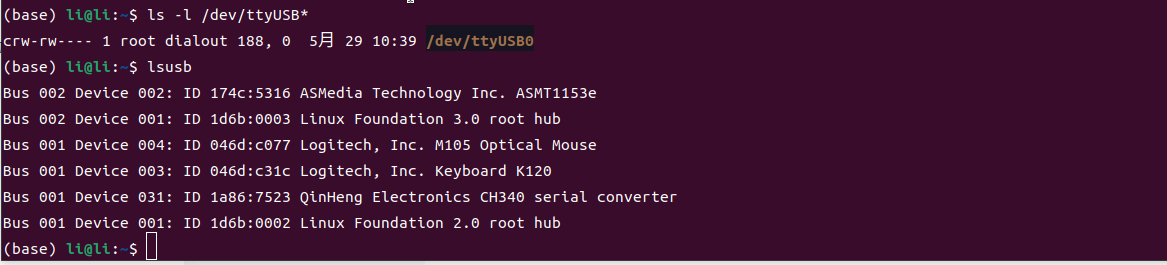
lsusb可以看到我的是CH340,每个人名称不一样
- 1.2:查看日志是否正常
sudo dmesg -l info | grep ttyUSB0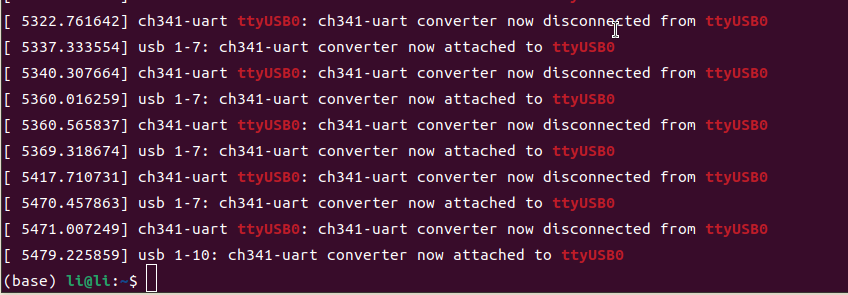
可以看到我的CH340,attached 表示连接正常
2:查看接线是否有问题
- 2.1:查看RX、TX是否接反
3:查看参数配置是否有问题
- 3.1:查看当前串口参数
stty -F /dev/ttyUSB0 -a
- 1. 波特率(Baud Rate)stty: speed 115200 baud
- 2. 数据位(Data Bits)stty: cs8
- 3. 校验位(Parity)stty: -parenb -parodd -cmspar
- 4. 停止位(Stop Bits)stty: -cstopb
- 5. 流控制(Flow Control)stty: ixon ixoff
- 3.2:调整串口参数
根据自己的板子,调整上述参数,一般调整波特率
stty -F /dev/ttyUSB0 115200 cs8 -cstopb -parenb调整完,在确认一次
stty -F /dev/ttyUSB0 -a- 3.3:正确配置options
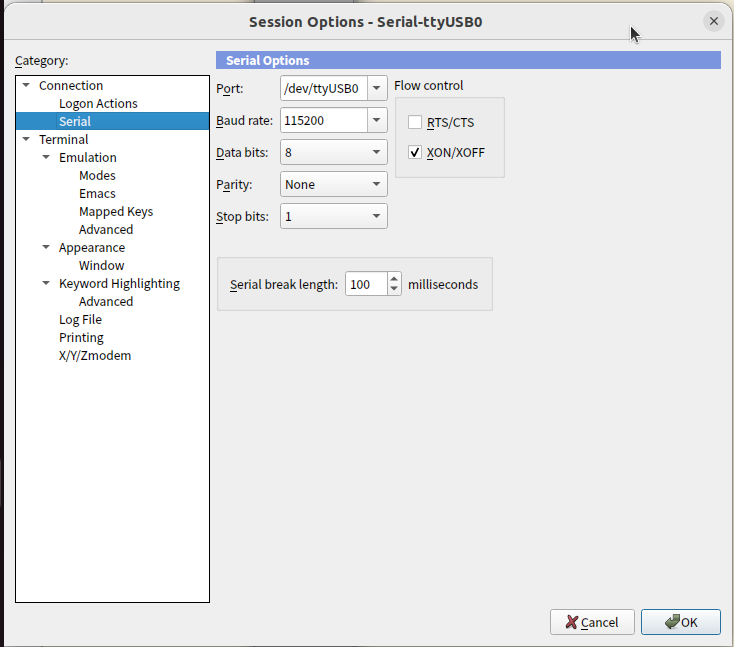
1. 波特率(Baud Rate)
Serial Options: 115200
stty: speed 115200 baud
2. 数据位(Data Bits)
Serial Options: 8
stty: cs8
3. 校验位(Parity)
Serial Options: None
stty: -parenb -parodd -cmspar
(-parenb 表示无校验)
4. 停止位(Stop Bits)
Serial Options: 1
stty: -cstopb
(-cstopb 表示 1 个停止位)
5. 流控制(Flow Control)
Serial Options: XON/XOFF
stty: ixon ixoff